
Billing
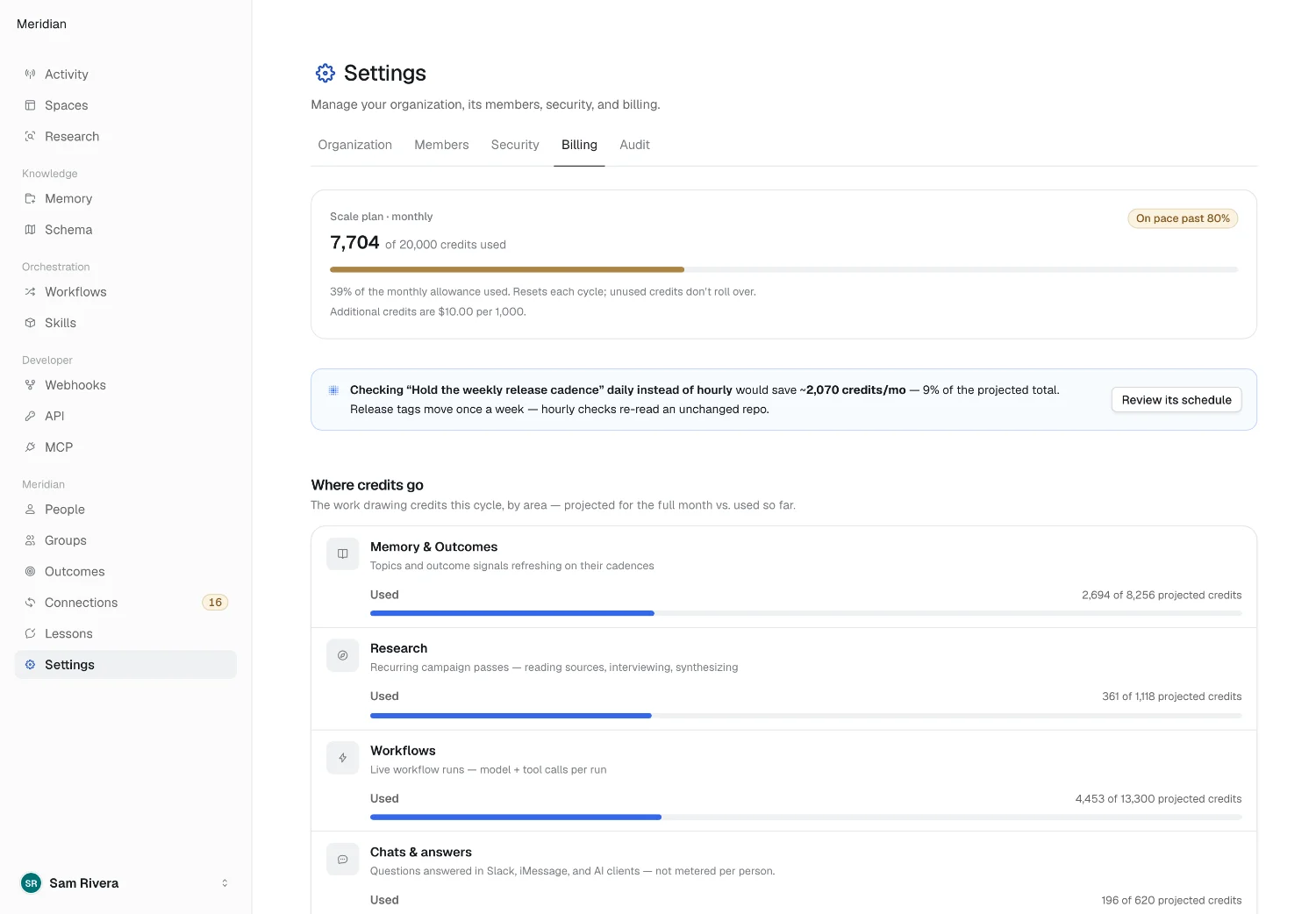
Billing lives under Settings → Billing in the console.
Credits, not seats
Section titled “Credits, not seats”Alma bills on credits — model calls and tool calls workflows actually make — not on the number of people you invite. Inviting people is free, so invite the whole team and add Person records for everyone else. What costs is workflows running.
Each run — a workflow run, a chat message, a research run — rounds up to the next whole credit, with a minimum of one credit for any run that does work. Background upkeep, like refreshing knowledge, rounds up once a day across the workspace.
The plan meter
Section titled “The plan meter”The top of the page shows your plan, credits used against the monthly allowance, and a pace badge: On pace — comfortable, On pace past 80%, or Over the allowance. The allowance resets each cycle; unused credits don’t roll over.
Going over the allowance doesn’t stop anything. Work keeps running, and the additional credits bill automatically at your plan’s per-1,000 rate on the next invoice. The meter shows how many credits you’re over and what they’ll cost.
Where credits go
Section titled “Where credits go”Once there’s usage this cycle, two panels break it down:
- Where credits go splits the cycle’s credits by area — knowledge, agents and workflows, research, and chats and answers. A few days into the cycle, each area also shows a projection for the full month.
- Top consumers ranks the topics, workflows and other work drawing the most credits, with each one’s share.
The areas add up to exactly what Stripe bills. To see what one workflow costs per run, use its ROI tab.
Choosing a plan
Section titled “Choosing a plan”A workspace without a subscription sees Pick a plan: each plan’s monthly credit allowance and price, with a Monthly / Yearly switch where yearly pricing is offered. A yearly plan is paid up front and still resets its credits each month. Choose plan opens Stripe Checkout; when you return, the page confirms the purchase and updates once the subscription is set up.
For volume pricing or a security review, pick Get in touch on Enterprise.
Managing your plan
Section titled “Managing your plan”Once subscribed, Plan & subscription shows your plan, allowance, price, and renewal date for yearly plans. Manage plan opens the Stripe billing portal, where you change plans, update your payment method, cancel, and download receipts.
Invoices
Section titled “Invoices”Invoice history lists every invoice with its amount and status — Paid, Open, Overdue, Processing, Action needed, or Failed. The current cycle’s charges show as Accruing until they bill at cycle end. Receipts also go to the billing email.
A workspace that hasn’t subscribed sees Usage by month instead: the credits drawn each month, with invoices appearing once it’s on a plan.
Payment problems
Section titled “Payment problems”When a payment needs attention, one notice appears on the page:
- Payment failed — a card charge didn’t go through and Stripe is retrying. Choose Update card to fix it in the billing portal.
- Invoice overdue — an invoiced workspace has a bill past its due date. Choose Pay invoice to pay on Stripe’s invoice page.
- Bank payment processing — an ACH debit is in flight and typically settles within four business days. Nothing to do.
- Verify your bank account — Stripe sent two small deposits; confirm the amounts to release the payment. An account left unverified for ten days has to be entered again.
- Bank payment failed — the debit was returned, with the bank’s reason. Pay it again from Stripe’s invoice page, by bank or by card.
The workspace keeps running while a bank payment is processing or being retried.
2026 Alma